
Framer 3.0: The AI Agent Understands Design Better Than I Expected
Over the past few years, Framer has grown from a simple design tool into a visual website builder, a CMS, and a publishing platform. Framer 3.0 makes that positioning explicit: an AI-driven workspace for building websites.
Most "type a prompt, get a website" AI tools produce something generic, template-heavy, and hard to tune to a brand's actual voice. That's the problem Framer 3.0 is trying to solve, by putting an AI agent inside the designer's existing workflow, where the process stays visible and editable instead of ending the moment a result appears.
Framer 3.0: Bringing the AI Agent onto the Canvas
Generating a page with AI used to mean typing a prompt and getting back a mostly unchangeable random result, a bit like opening a blind box and hoping it turned out well. Framer 3.0 puts the AI agent directly on the canvas designers already know.
Framer's official Framer 3.0 announcement, covering how Agents, Branching, and the new community features work together. Watch on YouTube
This AI agent actually reads the project's context: page layouts, components, text styles, brand colors, and CMS content, instead of generating something unrelated to your site out of thin air. The practical use cases are specific: build a new contact page that follows your existing style, add animation to several pages at once, clean up a messy set of text styles, or make a whole site responsive in one pass. You don't have to hand off the whole screen either. Zooming, dragging, and fine-tuning details is still yours to do at any point, which makes it feel more approachable for designers than pure-code AI tools like Cursor, which are powerful but come with a steeper technical bar.
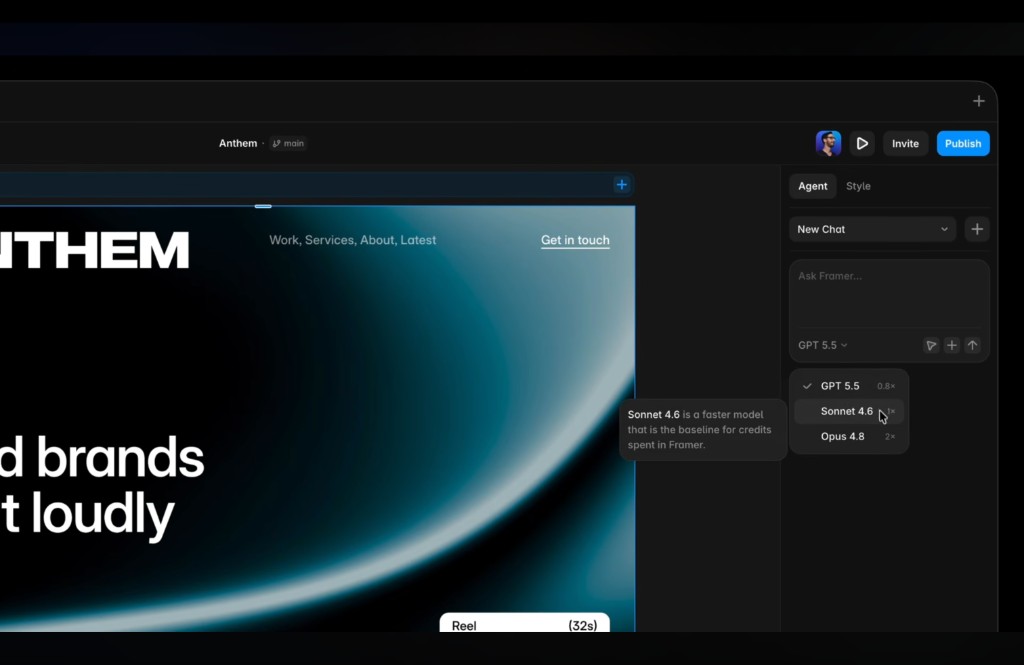
The Agents panel on the right lets you switch models directly, and each one carries a different credit multiplier: GPT 5.5 is 0.8x, Sonnet 4.6 is the default 1x baseline, and Opus 4.8 is 2x. The more capable the model, the more credits it burns through.
Branching: A Way to Manage AI's Uncertainty
The concept of branching comes from version control in software development, usually used when several people are editing the same project at once: everyone works in their own branch first, and only merges back to the main line once things check out, so nobody steps on anyone else's work and nothing untested goes live. The idea itself is simple: pull an independent copy off the project, make any changes you want inside that copy without touching the live version, then merge it back once it's confirmed to work.
AI can restructure a responsive layout or clean up styles across an entire site in one click, which is efficient, but that efficiency comes with more risk. Branching brings that same version-control idea onto the design canvas, giving big changes a safe space to fail in: let the agent make a full round of edits inside a branch, confirm the visuals and interaction logic hold up, then merge it back into the main site.
If something breaks, you just remove the branch and the live site is untouched. That's especially useful for larger sites, marketing teams, and design agencies, letting AI take bigger swings without any risk to production. A good chunk of what teams need to manage well in 2026 is really this: how to systematically handle the fact that AI's output isn't always certain yet. Branching is built exactly for that gap.
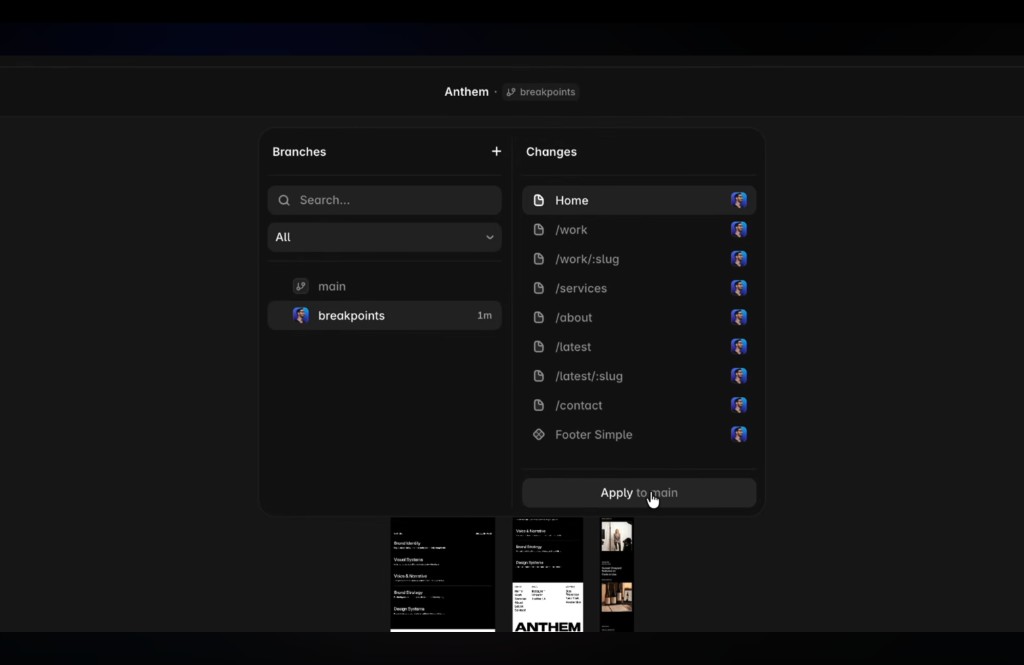
On the left, this project has a branch called breakpoints alongside main. On the right, Changes lists the pages that branch touched (Home, /work, /services, and so on). Once everything checks out, Apply to main merges it back into the live site.
External Agents: Bring the AI You Already Use
Framer 3.0 doesn't just ship its own agent, it also opens up to external AI tools like Claude Code, Cursor, and Codex. The practical use case is specific: hand a messy folder full of CSVs, Markdown files, and images to Claude Code, ask it to structure the content, and import it straight into Framer's CMS, with fields, items, and pages set up automatically. That kind of data-wrangling used to mean pasting things in one by one by hand. Now an external agent can take it over, and Framer becomes a more flexible AI workstation as a result.
Community and the Template Marketplace Get a Reshuffle Too
Framer also upgraded its community and template marketplace this round, adding activity feeds, member profiles, likes, and comments, making it easier for template creators to get noticed. In an era where AI can generate a basic webpage without much effort, generic templates lose value fast. What holds up instead are templates built for a specific niche, with a distinct style and real craft behind them, the kind a project is actually willing to pay for.
AI Is Leverage, Not a Replacement
With AI in the loop, a designer's role shifts from "executor" toward "decision-maker." The old model of trading time for money on freelance work can now shorten turnaround and raise rates through better workflows, or turn accumulated design skill into a product, like a Framer template or a course, something that keeps generating income without trading more time for it.
Paired with Framer's CMS and external AI tools, one person can now produce what used to take a small team. What's actually valuable in this setup is the judgment behind deciding what to do and what not to do. AI just executes the decision.
Closing: Tools Turn Over Every Few Months, Workflows Don't Have To
Framer 3.0, Claude, or whatever tool is on your desktop right now will eventually get replaced by something newer. What's worth actually investing in is a system that can keep absorbing new technology as it shows up.
This update reads like a clear dividing line: Agents make output faster, Branching makes changes safer, External Agents make data handling more flexible. If you've been curious about building a site with AI but find terminals and code too unfamiliar, Framer 3.0 is a reasonable place to start.
AI can now take over most of the execution. What's left, that small remaining piece of judgment and taste, is what actually decides what a site or a brand looks like. Go open a branch in Framer and try it for yourself. If it breaks, you can just throw it away.
Related Posts
Framer Portfolio Tutorial: From Figma Design to Published Site
Build a Link in Bio with Framer Agent: Process and Free Template
Framer Review: Features, Pros and Cons, and Who It's For

5 Free Framer Portfolio Templates to Boost Your Interview Odds

Framer Template Guide: The Simplest No-Code Way to Launch a Site